
 Styles
Black and white headshots
Removing the colour removes the distraction: a monochrome portrait is read as face, light and expression. That is either exactly what you want or exactly what you do not.
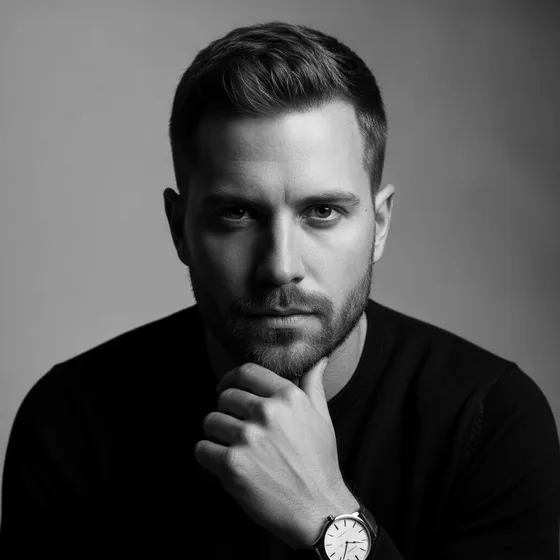
What monochrome communicates
Black and white reads as considered and slightly serious. It is the convention in editorial portraits, author photos, theatre and much of the arts, and it is used in corporate contexts where a company wants to look established rather than friendly.
It also removes information: clothing colour, background tone and the small colour cues that make a photo feel current. That is what makes it age well, and what makes it feel wrong in a context that expects warmth.
- Works for: authors, actors, arts and editorial profiles, established brands.
- Works less well for: friendly service businesses, clinical profiles, dating.
- Ages better than colour, because it carries fewer period cues.
- Needs contrast — a flat image turns into grey mud in monochrome.
Making a black and white portrait that holds up
Monochrome is unforgiving of soft light. With the colour gone, the image is carried by the contrast between the lit side of the face and the shadow side, so the light has to be directional: a window at 45 degrees, or a single soft source from one side.
Shoot in colour and convert, rather than shooting in a monochrome mode. The colour original keeps more information, and the conversion can be tuned afterwards for the skin tones and the background separately.
- Directional light: one soft source at 45 degrees.
- Darker background than the face, for separation.
- Shoot in colour; convert afterwards for more control.
- Check the eyes — in monochrome, dull eyes are obvious.
Generating a monochrome set
AI Headshot Pro: Zenith Studio includes a black-and-white style among its presets, so a monochrome set is generated from the same source photos as a colour one, with the light and contrast already handled.
That is useful for authors and performers who need a colour version for a directory and a monochrome version for a jacket or a programme.
How it works
Three steps from a phone photo to a finished image
Upload your photos
Six to ten selfies with different angles and expressions.
Pick a style
Business, editorial, black and white, cinematic — or a profession set.
Download the set
A consistent batch of portraits, ready for your profile.
FAQ
Frequently asked questions
Are black and white headshots professional?
Yes, in the right context. They are standard for authors, actors, editorial profiles and established brands. They read as less warm than colour, so they are a weaker choice for service businesses and clinical roles.
How do I take a good black and white headshot?
Use directional light — a single soft source at 45 degrees — against a darker background, and shoot in colour so you can convert afterwards. Monochrome depends on contrast, so flat, frontal lighting produces a grey, lifeless result.
Should my LinkedIn photo be black and white?
Usually not. LinkedIn's convention is a colour portrait in business dress; a monochrome image reads as editorial and stands out in a way that is not always an advantage in a professional directory.
Can I get both colour and black and white versions?
Yes, and it is the usual approach: generate a colour set for directories and CVs, and a monochrome set for a book jacket, a programme or an editorial page. Both come from the same source photos.
Try it on your next photo
Free to download on the App Store. iPhone and iPad only.