
 Apps & tools
Sports card organiser
Organising is not about tidiness. It is about being able to answer 'do I already have this?' in five seconds rather than opening four boxes.
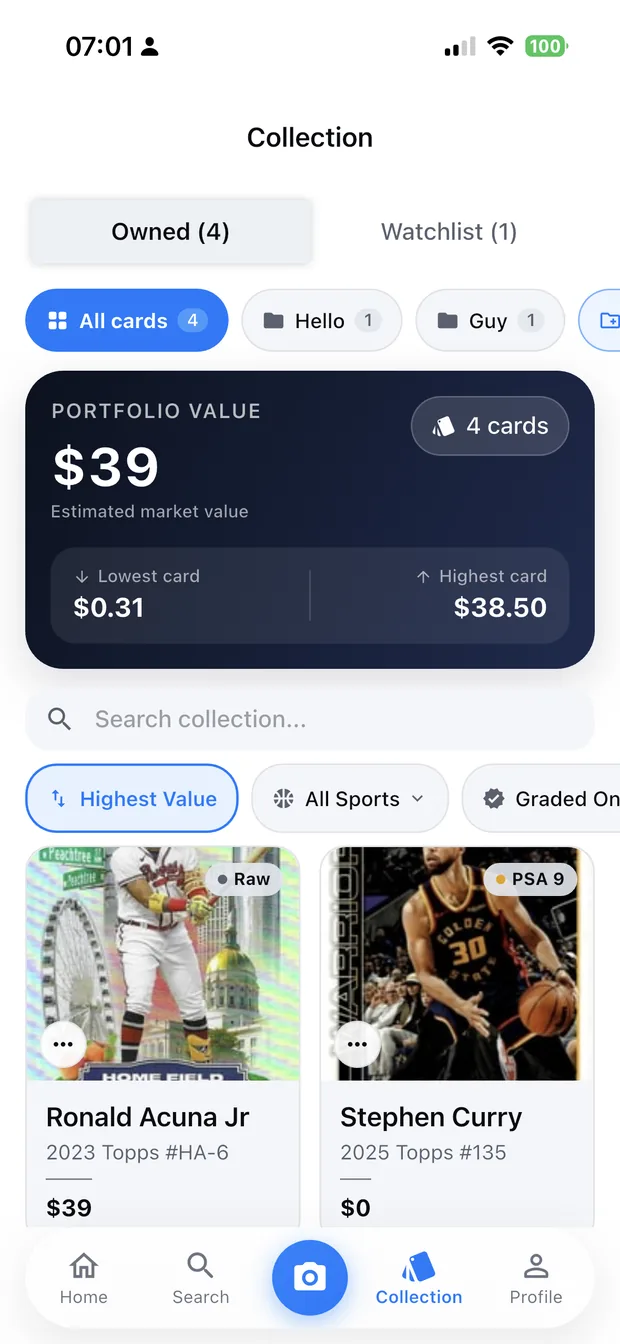
The three structures that work
Most collections need three ways in: by player or team, by set, and by status — what you own, what you are hunting, and what is for sale. Folders cover the first two, and a separate list covers the third.
- Folders by player or team, for personal collections.
- Folders by set, for set builders.
- A want list, separate from what you own.
- A sale pile, so selling decisions do not require a re-sort.
Finding things
Search is what makes an organised collection faster than a box: by player, by set, by year, by card number. Filters narrow it further — by sport, by value, by whether a card is graded.
Sorting by value is the most useful view in a large collection, because it puts the cards that matter at the top and makes the rest obviously bulk.
- Search by player, set, year or card number.
- Filter by sport, value or grade.
- Sort by value to find what matters.
- Edit quantity so duplicates are recorded, not repeated.
Organising as you scan
The reason collections end up unorganised is that sorting happens in a separate session, which never arrives. Filing a card into a folder at the moment you scan it takes seconds and means the structure builds itself.
Zenith keeps folders, filters and a watchlist alongside the scan flow for exactly that reason: the organisation is a side effect of the valuation, not a second job.
How it works
Three steps from a phone photo to a finished image
Scan the card
Point the camera at it — raw, sleeved, in a binder or in a slab.
Confirm the match
Check the player, year, set and parallel Zenith read.
See the value
The card lands in your collection with a market value attached.
FAQ
Frequently asked questions
How should I organise my card collection?
Three ways in: by player or team, by set, and by status — owned, wanted, for sale. Folders cover the first two, and a separate want list stops you buying duplicates of cards you already have.
What is the most useful way to sort cards?
By value. In a large collection it puts the cards that matter at the top and makes the rest obviously bulk, which is what tells you whether to sell singles or the whole box.
Do I need a want list?
Yes, if you are building a set or collecting a player. It is what stops duplicate purchases and missed gaps, and it is the list you check before a card show rather than relying on memory.
How do I organise a collection without it taking weeks?
File each card as you scan it. The structure then builds itself as a side effect of the valuation work you were doing anyway, rather than as a separate project that never happens.
Try it on your next photo
Free to download on the App Store. iPhone and iPad only.